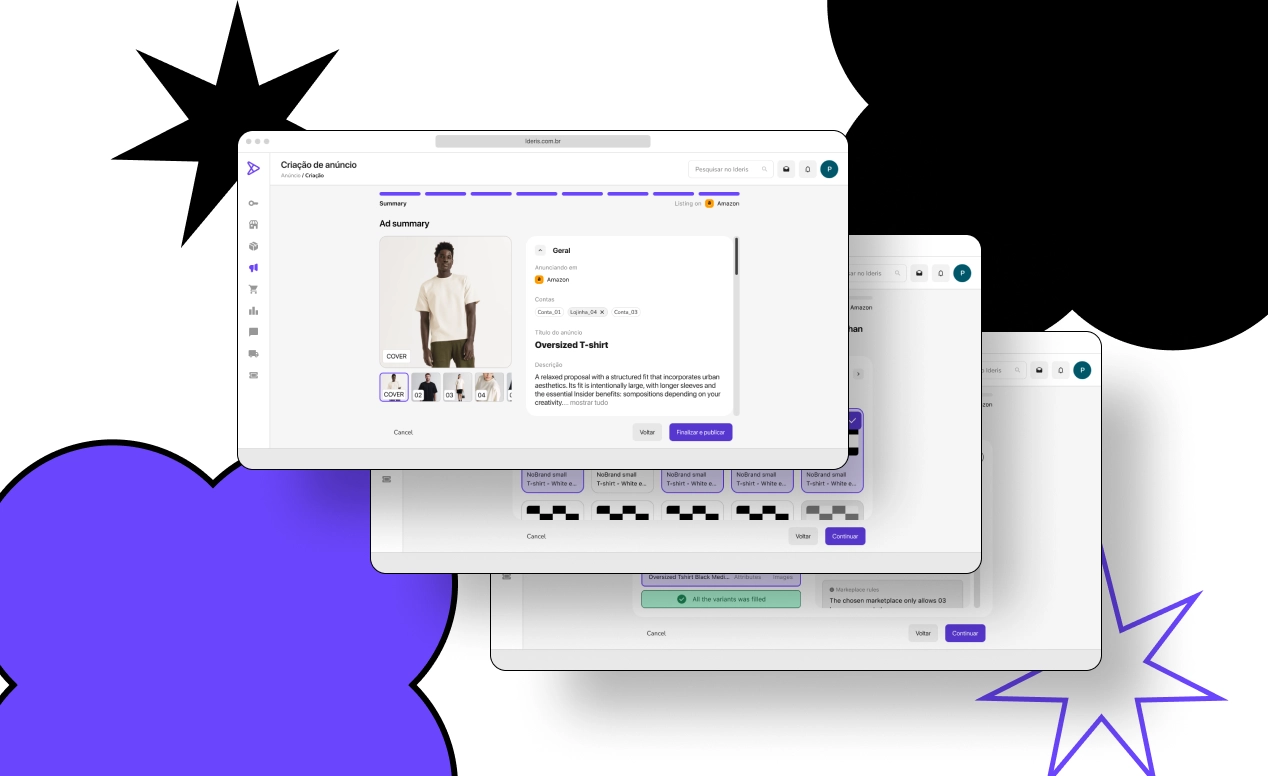
The new listing creation flow (Criação de anúncio) at Ideris: a step-by-step wizard that ends in an ad summary before Finalizar e publicar (Finish and publish).
An easier way to list on marketplaces: -45% tickets
How I simplified the listing creation flow from 6 fragmented steps into 1 guided flow, cutting support tickets by 45% and increasing the creation success rate by +30pp.
DISCLAIMER: Sorry, dear reader: the project is real, but this text was written by AI and it's a pretty boring read… I'm rewriting my case studies with my own two handz, I just can't leave this page empty. It's still a great case — just a bit dull to read.
Role: Product Designer
Responsibilities: Discovery, product definition, prototyping, usability testing and handoff
Impact: ~45% fewer support tickets related to listing creation | 100% success rate on the main usability test task
Timeline: ~3 months (Q1 2022 — Discovery → Testing → Beta)
Team: Michel (Product Designer) + Product Owner + Customer Success + Engineering
Context: Ideris — a marketplace hub that connects sellers to 25+ marketplaces to manage inventory, sales and listings
The Problem: A Flow That Generated More Questions Than Listings
In the first quarter of 2022, the listing creation process on the Ideris platform drove a significant increase in support tickets — accounting for 65% of tickets opened in January and 69% the following month.
Together with the CS team, we triaged these tickets and found that the overwhelming majority were related to unsuccessful attempts to create a listing. The most common errors shared a root cause: information filled in incorrectly by the user, which the platform neither prevented nor flagged.
In other words, the problem wasn't the user. It was the platform that didn't guide the user.
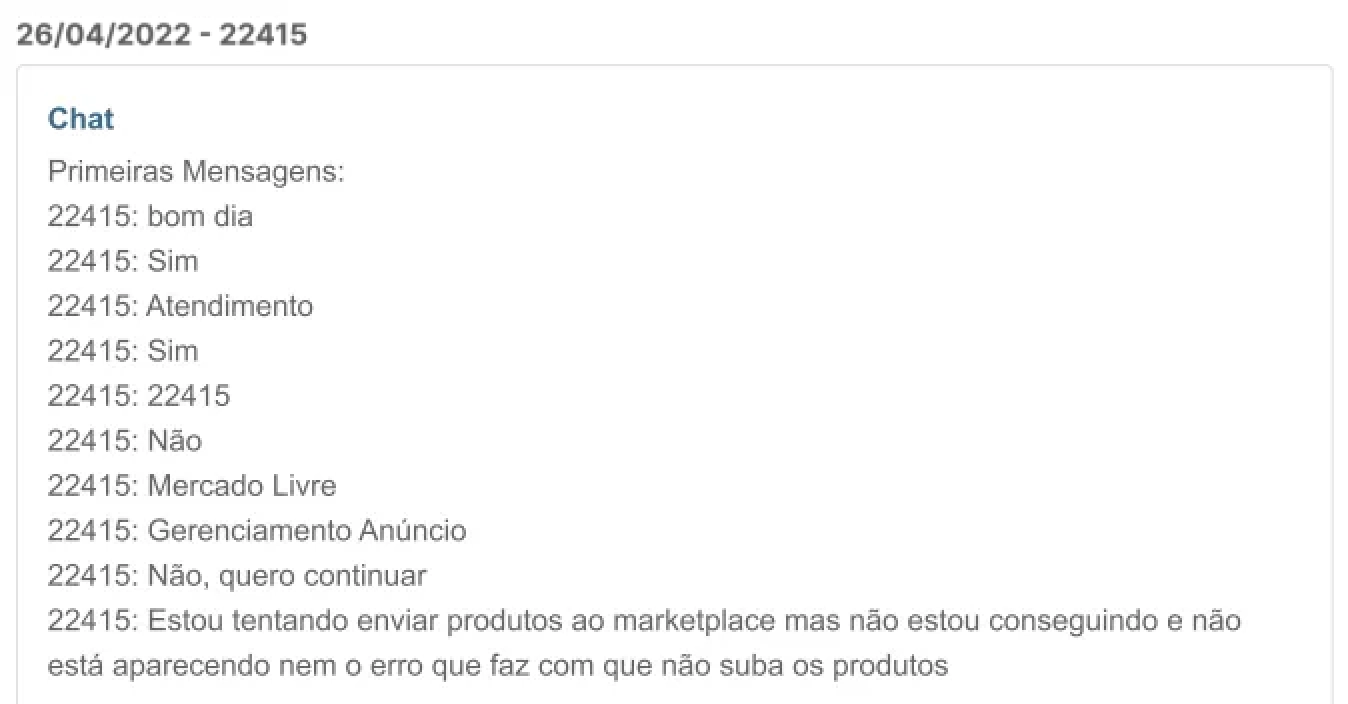
Figure 01: A customer tells support that the platform won't create the listing on the marketplace and doesn't show what went wrong. Their message: "I'm trying to send products to the marketplace but it's not working, and it's not even showing the error that's keeping the products from uploading."
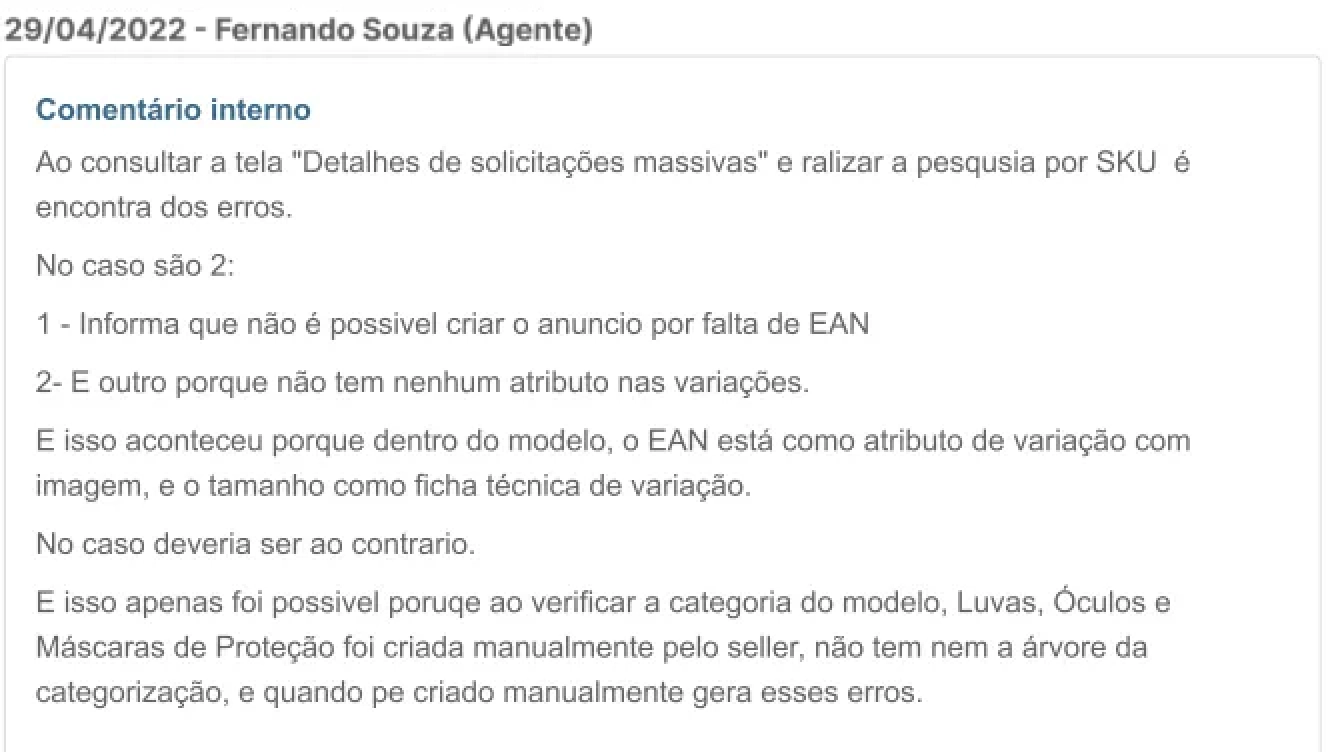
Figure 02: The developer's analysis of the error, finding that the user had misconfigured the category they filled in — an error good usability could have prevented. The internal note lists two errors: the listing couldn't be created because the EAN was missing, and the variations had no attributes — because, in the template, the EAN had been set as a variation attribute with an image and the size as a variation spec, when it should have been the other way around. This was only possible because the seller had created the category (Gloves, Goggles and Protective Masks) manually, with no categorization tree.
The Gap: Platform vs. Marketplace
Together with the PO and the developers, we mapped the minimum requirements to create a listing. The comparison revealed a clear misalignment:
| Marketplace (direct) | Ideris platform | |
|---|---|---|
| Requirements | 8 fields | 13 fields |
| Flow | Linear, guided | Fragmented across multiple screens |
The platform required more steps than the marketplaces themselves — and spread those steps across different places in the interface, with no logical sequence.
Interviews: Confirming with the People Who Use It
To understand how sellers actually operated, we ran interviews to map their pain points. The findings were revealing:
Main pain: Difficulty completing all the steps required to create a listing — with creating and mapping categories and attributes being the step with the most friction.
Unexpected behavior: Users created listings directly on the marketplaces and then imported them into Ideris just for inventory control. In other words, they were using external tools to work around the platform's difficulties.
Overall sentiment: Users felt lost, with no consistent information architecture to guide them through the process.

From one of the interviews. Me (eu, bottom right): "How does creating a listing work in your day-to-day using the platform?" The seller: "We keep using the approach I mentioned last time. I create a listing on the marketplace and then import it into the platform."
Synthesis: 3 Core Problems
After the discovery phase, we consolidated the findings into three main problems:
1. Confusing usability — Too many required steps, scattered across different parts of the platform, with no clear logical sequence.
2. Silent frustration — The platform didn't communicate whether steps had been completed correctly, and at the end of the process the listing simply failed — without explaining why.
3. Escape to external tools — With such a difficult process, sellers created listings outside the platform and only used Ideris for inventory management — a churn risk and an underuse of the product.
The Strategy: From 6 Fragmented Steps to 1 Unified Flow
What we had before
To create a listing on the platform, sellers had to complete 6 steps on different screens, with no indication of progress or sequence:
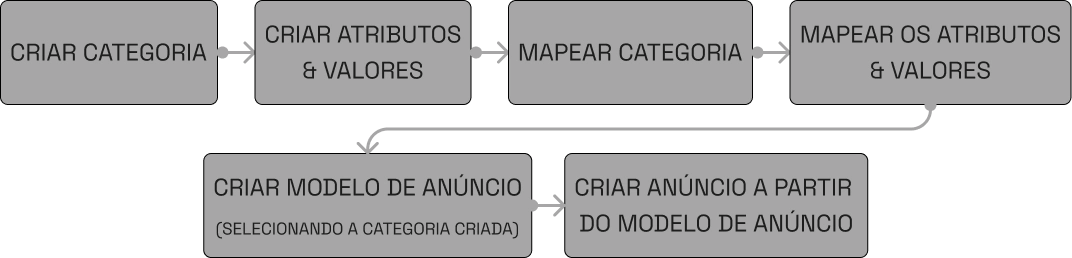
The 6 steps: Create category → Create attributes & values → Map category → Map attributes & values → Create listing template (selecting the created category) → Create listing from the listing template.
Each step had its own complexity and requirements. Sellers had to know, on their own, that "Create Category" came before "Map Category", that they needed a "Listing Template" before creating the final listing, and so on. There was no guide, stepper or progress feedback.
Aligning with the Team
After analysis and discussion with product and engineering, we defined that the solution had to meet three criteria:
1. Eliminate unnecessary steps — The new flow shouldn't require creating categories, attributes and listing templates separately. The number of processes had to drop drastically.
2. Prevent errors at the source — The system should ensure information was filled in correctly, making it impossible for creation to fail because of user errors in required fields.
3. Be easy to learn and use — The experience should remove any need for sellers to look for alternative ways to create listings outside the platform.
Trade-off: Speed vs. Scope
One point we discussed with engineering was the scope of the refactor. Redesigning the entire flow at once would mean a months-long project. The decision was to focus first on the listing creation flow — the most painful part for users — and iterate on the earlier steps (category mapping, template) in later phases.
This let us deliver value faster without compromising the quality of the core solution.
Development: Two Proposals, One Decision
Exploring Paths
With the criteria defined, I designed two solution proposals:
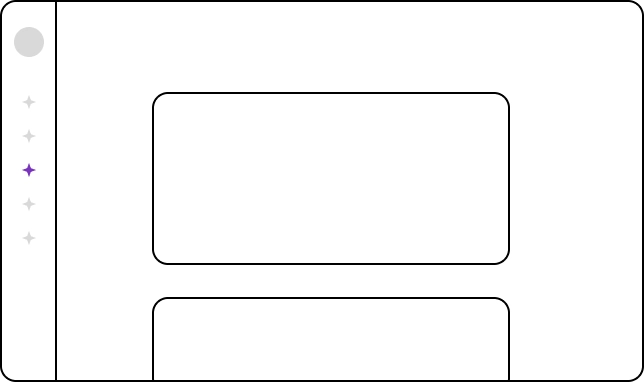
Proposal A — Linear Flow (Single Page): A single-screen process, based on the listing creation experience of the marketplaces sellers already used. All fields visible at once, with vertical scrolling.
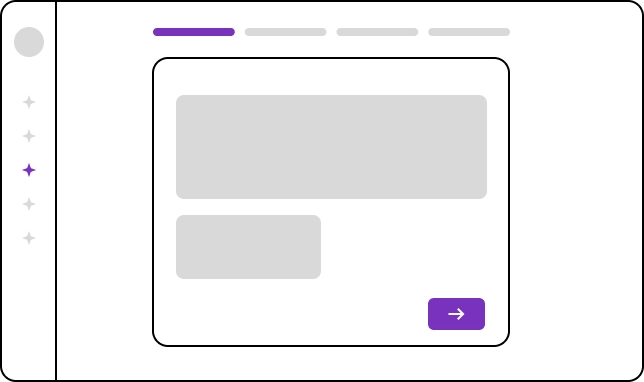
Proposal B — Step-by-Step Flow (Wizard): A process split into clear steps, focusing the user's attention on the tasks of each phase. Each step validates the data before letting the user move on, preventing input errors.
Aligning with the Devs (Before Testing)
Before investing time in usability tests, I aligned with the development team on the technical blockers and complexities of each proposal. This step was intentional — there's no point in testing something that can't be built in time.
Engineering's feedback showed that both proposals were feasible, but the step-by-step version had a technical advantage: it enabled per-step validation, reducing the chance of sellers reaching the end with incorrect data — exactly the problem behind the tickets.
Based on that alignment, we decided to write the test script for the step-by-step version.
Usability Testing
Sample: 8 strategically selected customers:
- 4 representing the profile that sustains MRR
- 1 with the highest average ticket
- 1 random customer
- 1 user of the platform's legacy version
The test was split into 5 tasks:
| Task | Result (rounded) |
|---|---|
| Select the products | 80% completed it easily |
| Fill in required data (spec sheet + variations) | 60% completed it easily |
| Fill in the description | 80% completed it easily |
| Add images | 50% easily + 50% with some difficulty |
| Create the listing (final task) | 100% completed it easily |
What the tests revealed
Despite the high success rate on the main task (100% on listing creation), we raised 2 points of attention that led to adjustments:
1. Image selection — The proposed model broke the flow users were already used to from the old listing template creation. We had to adjust the interaction pattern to reduce the learning curve.
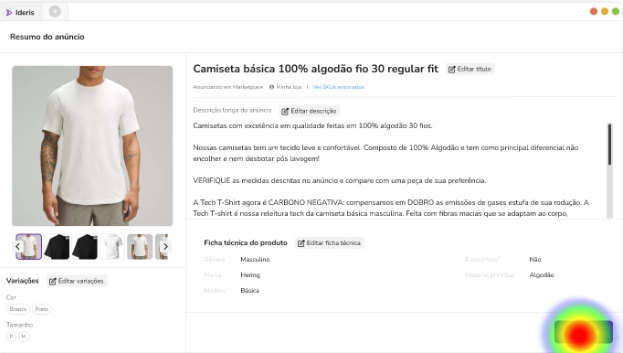
Usability test heatmap on the ad summary screen (Resumo do anúncio), which brings together title, images, description, variations and the product spec sheet (Ficha técnica). The hotspot sits on the action button in the bottom-right corner.
2. Navigation between steps — We identified the need to add explicit "continue" and "back" buttons, to avoid accidental input in the wrong steps.
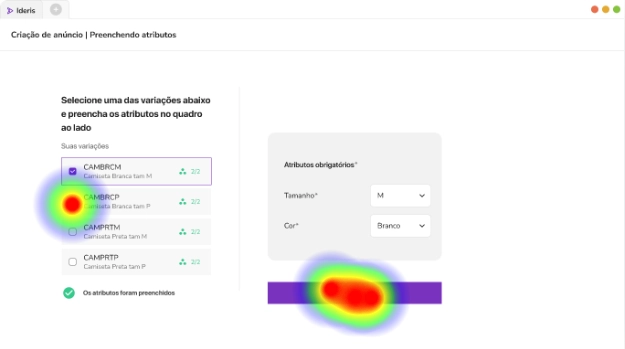
Heatmap of the attribute-filling step (Criação de anúncio | Preenchendo atributos — Listing creation | Filling in attributes): the user selects one of the variations on the left and fills in the required attributes (size and color) on the right. Clicks cluster on the variation list and on the bar below the attributes panel.
The Final Solution
The solution focused on guiding sellers through each step of creation, so they only concentrate on the tasks relevant to each phase. The step-by-step flow with per-step validation ensured input errors were caught before final submission — eliminating the main cause of support tickets. Try it here.
Results: Delivery and Validation
Launch Strategy: Controlled Beta
We opted for a beta launch for customers selling on a single marketplace (Mercado Livre). This was a strategic decision — it let us test all of one marketplace's business rules before scaling to the other 24 the platform integrated with.
During the beta:
- Follow-ups and feedback meetings with the selected customers
- Ticket monitoring with the support team to validate whether the goals were being met
Impact on Support Tickets
After the full rollout to all users, we set up tracking with the support team for tickets related to listing creation.
Before (Q1 2022) — The scenario that motivated the project:
| Month | Total tickets | Listing creation tickets | % of total |
|---|---|---|---|
| January | 312 | 203 | 65% |
| February | 287 | 198 | 69% |
After (Q3 2022, post-rollout):
| Month | Total tickets | Listing creation tickets | % of total |
|---|---|---|---|
| July | 274 | 118 | 43% |
| August | 261 | 102 | 39% |
Direct comparison:
| Metric | Before (Jan-Feb average) | After (Jul-Aug average) | Delta |
|---|---|---|---|
| Listing creation tickets / month | ~200 | ~110 | ↓ 45% reduction |
| Tickets caused by input errors | ~140 | ~38 | ↓ 73% reduction |
| Listing creation success rate | ~55% | ~85% | ↑ +30pp |
| % of total tickets | 67% | 41% | ↓ -26pp |
Per-step validation in the step-by-step flow was the main driver of the drop in input-error tickets — the system now kept sellers from moving forward with incorrect data, eliminating the root cause of most tickets.
Impact on the Experience
| Metric | Before | After |
|---|---|---|
| Steps required to create a listing | 6 steps on separate screens | 1 unified flow with steps |
| Error feedback to the user | None (the listing failed silently) | Real-time validation at each step |
| Sellers creating listings outside the platform | Frequent behavior (workaround) | Significant reduction after the new flow |